.png)


THE BEST
KIOSK MODE
SOFTWARE
Transforming android touchscreens into dedicated kiosk to work in restricted, dedicated touchscreens.


LICENSE FREE ON ALL GLORY STAR TOUCHSCREEN COMPUTERS WITH ANDROID VERSION.
What is Kiosk Mode?
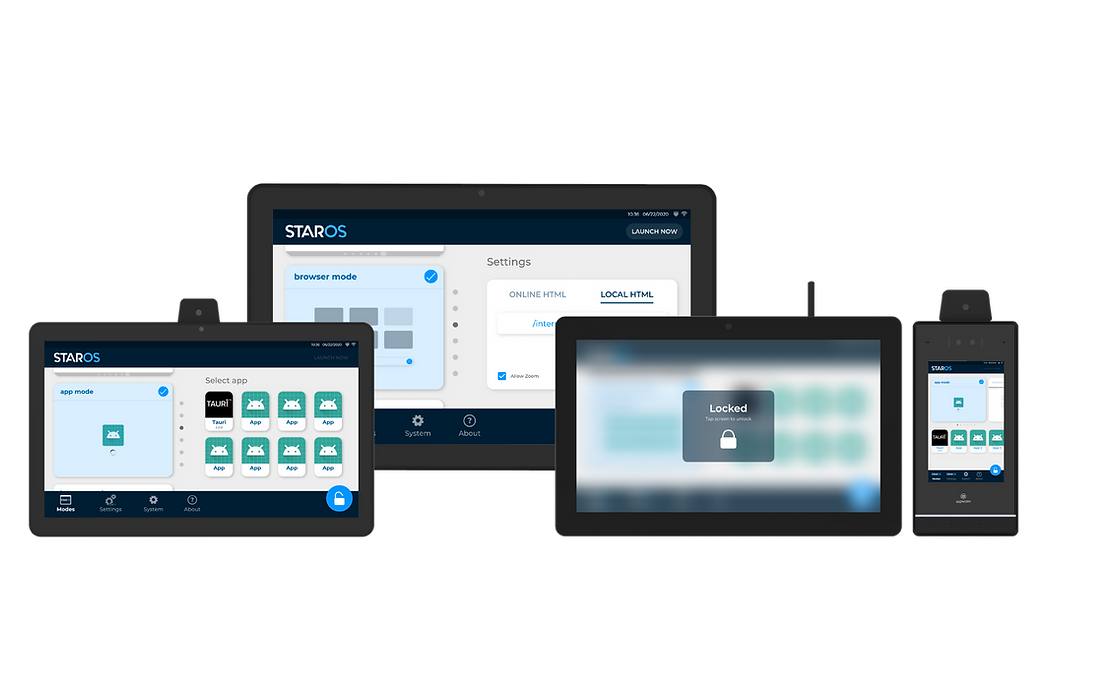
STAROS is a powerful kiosk mode and lockdown solution that enables businesses to comprehensively control and customize self-service kiosks. With flexible modes like media player, browser, full-screen browser, app, and multi-app, companies can tailor the kiosk experience to their needs. STAROS also provides advanced configuration options, including device updates, language selection, and e-commerce-enabled screensavers, further enhancing the customer-facing kiosk experience.

Single App Kiosk Mode
Single-app kiosk mode restricts devices to one IT-managed application, ensuring distraction-free customer interactions for digital signage, POS, or hospitality services.
Multi App Kiosk Mode
Multi-app kiosk mode allows IT-controlled access to multiple apps and select device settings, enabling tailored self-service for businesses in service, education, and logistics.

Browser Kiosk Mode
Browser kiosk mode limits devices to specific websites or web apps, ideal for public settings like libraries, ensuring secure, task-focused use with tailored functionality.

Kiosk Mode Screensaver
Kiosk devices can display engaging screensavers when idle, enhancing customer experience across various kiosk modes. Comprehensive lockdown controls enable centralized management of updates, content, scheduling, and remote registration for tailored self-service.

Scheduling Display Startup and Shutdown
Schedule kiosk display startup, shutdown, and restarts with customizable, time-based settings to ensure efficient operation aligned with business needs.

Connects to Mobile Device Management
STAROS integrates with Star Control, Anthropic's MDM platform, for centralized kiosk management. Admins can register kiosks via STAROS settings using a PIN or credentials, ensuring reliable connectivity and remote administration.
Benefits of Kiosk Mode
1
Preventing users from accessing inappropriate apps and content.
2
Blocking any attempts to download malicious software intentionally or unintentionally.
3
Turning off-the-shelf devices into dedicated kiosks, signs, or dual-purpose digital signage kiosks.
4
Keeping kiosk mode safe from interference by protecting settings menus with passwords.
5
Improved device and data protection by limiting internet access
6
This lockdown approach promotes productivity and security without the need for specialized training or additional staff.

DEMO VIDEO
Watch how you can easily use Staros kiosk lockdown software (free with every Glory Star tablet purchase). Choose from five different modes: single app, multi app, browser, full screen browser and media player to transform a regular kiosk tablet into one that can serve your business.
Glory Star’s kiosk lockdown software is pre-installed with every tablet. If you don’t want to go through the hassle of installing the kiosk lockdown software yourself, then this is the out of box solution for all business owners. Start the tablet when you receive it and after completing the onboarding process, Staros the kiosk lockdown software will automatically start up on the tablet. Select the mode and enter the settings to customize how you want your kiosk tablet to behave when it is in lockdown mode. Don’t forget to press launch to enter lockdown mode!
Setting Up Kiosk Mode on Android Touchscreens
Kiosk Mode software can be used anywhere

Retail
Deploy customized tablets that display catalogs, menus, display signage - tailor the user experience to your business.

Food industry
Display queueing status and add a printer to print out queue tickets to increase maximum efficiency and transparency.

Exhibition and shows
Create a touch screen display using accessories such as an RFID scanner to showcase your products.

Medical centers
Provide patients private access to their medical data while protecting privacy and safeguarding against data breach.

Public institutions
Display necessary information and check in procedures for visitors by setting up an information kiosk and check in tablet.

Factory automation
Display production line data to ensure higher employee productivity.
Kiosk Mode Tablets Anytime
The kiosk lockdown software can lockdown devices to ensure safety against hackers at any time of the day. With a cloud platform such as Star Control, it is easy to switch between modes from any internet connected device even when you are not in close proximity to the tablets.